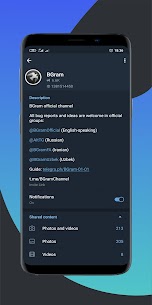
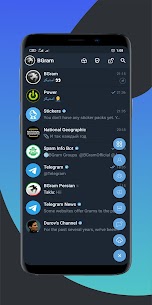
BGram is a communication apk for Android & iOS users. Advanced unofficial client based on Telegram API.
More Android & iOS Apps:
- Messages Apk Download
- Telegram Apk Download
- Discord – Chat, Talk & Hangout Apk Download
- Snapchat Apk Download
- Google Chrome: Fast & Secure Apk Download
- WhatsApp Business Apk Download
- Gmail Apk Download
- Messenger Lite Apk Download
- Viber – Safe Chats And Calls Apk Download
- Carrier Services Apk Download
- Firefox Fast & Private Browser Apk Download
- Psiphon Pro – The Internet Freedom VPN Apk Download
- Google Duo Apk Download
- UC Browser-Safe, Fast, Private Apk Download
- Opera Browser: Fast & Private Apk Download
- Pi Browser Apk Download
Table of Contents
About BGram Apk & Features
Features:
• Create your own chat tabs with icon support from PNG.
• Direct chats: you can make a new folder and set it as Direct chats, which will be shown in the sidebar and as a tab.
• Batch actions with chats (mark read, delete, etc.) and contacts.
• Auto-merge your messages sent in a row.
• Confirmation of sending audio, video, messages, GIFs, stickers.
• Change interface fonts with viewing and setting ttf from chat.
• Hidden chats with telegram password protection and fingerprint login.
• Auto-selecting a proxy based on ping and connection speed.
• Built-in TOR.
• Forward messages without quoting, with editing, or adding caption to the media.
• Copy part of the message.
• Improved formatting panel (with quote and reply to selected phrase).
• Create links in two clicks.
• Increase the limit of pinned chats to 100.
• All types of shared media in the profile.
• Photo in chat for the entire width of the screen.
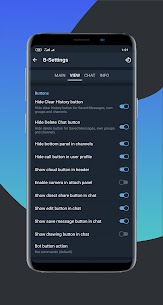
• Hide bottom panel in channels.
• Search button in each chat.
• Save to cloud and Edit buttons next to chat messages.
• Copy links and user names by click.
• Reply and save to the cloud (in channels) swipe left, forward swipe right.
• “Forward and delete original messages,” save selection after multi forward, “etc.
• Quick access to functions by long tap on various interface elements.
• Fast selection (in 3 clicks) of message groups and batch actions (save to the cloud, copy links).
• Long tap actions in searching results: on chat avatar — copy username, on message — copy link to message.
• Search for replies to your messages on all chats (long tap the search button on the main screen).
And many other options…
Official channel:
Official support group:
Video Guide:
Hope you enjoy it.