Grow your business with SKEDit, the all-in-one Scheduling App & Autoresponder that lets you Schedule WhatsApp Messages with WhatsApp Scheduler, set Whatsapp auto-replies with WhatsApp AutoResponder, Schedule SMS, Send Emails Later, and set call reminders. This Scheduling app & Autoresponder acts like your personal assistant. Boost productivity, save time, and reduce stress!
Schedule, Auto-Send, Auto-Reply; SKEDit – Set your communication on Autopilot
SKEDit is a marketing and productivity tool for small businesses and busy individuals that covers the full communication cycle. SKEDit schedules WhatsApp messages, SKEDit auto sends WhatsApp Messages, SKEDit auto-replies to incoming responses! Let SKEDit take care of your Whatsapp messaging while you focus on something else!
Check More Communication Apk For Android & iOS:
Table of Contents
Features Of SKEDit WhatsApp Automator
Why SKEDit:
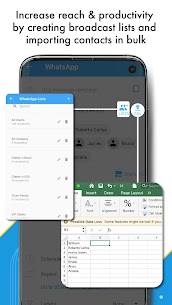
⭐Increase your audience reach and win more business – contact more people faster
⭐Improve engagement and experience – send personalized messages to many people at the right place at the right time and set custom auto-reply rules to complete the communication cycle
⭐Boost productivity, save time, and organize your communication with SKEDit’s various scheduling features
⭐Stay on top of your important communications by planning them ahead of time
⭐View your communication schedule across multiple channels in one place
⭐Let SKEDit do the hard work while you focus on other tasks – SKEDit schedules, SKEDit sends, SKEDit replies!
SKEDit Features
⭐ Automate message sending
⭐ Send unlimited messages
⭐ Add unlimited recipients
⭐ Add recipients in bulk with .csv
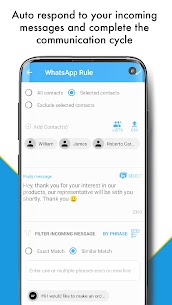
⭐ WhatsApp AutoResponder: set custom WhatsApp auto-reply rules – exact or similarity matching of one or more keywords or phrases, and decide whether to include or exclude certain contacts
⭐ Calendar View of you scheduled messages
⭐ Multiple contact selection when scheduling
⭐ Add unlimited attachments of all formats: Images, videos, audio, .pdf, documents, & many more
⭐ Set customized repeats – e.g. by day of week when scheduling a message
⭐ Create Drip Message Campaigns for WhatsApp Scheduling and other
⭐ Create & Save Message Templates when scheduling WhatsApp messages or for Auto-replies
⭐ Use Labels to categorize your scheduled WhatsApp messages
⭐ Message Statistics & Analytics on WhatsApp scheduler and Whatsapp AutoResponder / AutoReplies
⭐ Fast multi-language support from SKEDit team
Possible Use Cases
● Marketing & Sales: Lead follow-ups, pushing product promotions and new collections, Engaging with customers with various announcements, etc.
● Business Productivity: Auto-sending messages in different time zones automatically, Sending instructions to your team, Sending out job opportunities, etc.
● Reminders: Appointment and task reminders, Special occasion reminders and sending greetings (birthdays, new years..), General announcements, ex.
HOW IT WORKS – 3 EASY STEPS
[1] Choose Communication Service: Select communication method you’d like to automate or set-autoreplies for.
[2] Add Content: Jot down your message or content you’d like to have automatically sent:. [3] Schedule Date & Time: Set exact time & date for your message, content or call. Sit back & relax while SKEDit handles the rest and auto-sends and auto-responds to all messages.DISCLAIMER & PERMISSIONS:
This app is NOT affiliated with WhatsApp. WhatsApp is a registered Trademark of Facebook Inc. Accessibility permission – used for automation.
Some services are not compatible with all devices (especially older ones with older OS), and require strict requirements for their automation to function properly (e.g removing screen lock- more details in help center), as the service itself does not provide any automation capabilities. Thank you for your understanding.